File verificationSignature matches the developer’s certificate
Unmodified file: same certificate as this app’s versions from the official app store, signed by JK.Fantasy. A signature shows who signed the file, not how the app behaves.
Hi, There you can download APK file "GPS Map Camera" for Android free, apk file version is 1.8.0 to download to your android device just click this button. It's easy and warranty. We provide only original apk files. If any of materials on this site violates your rights, report us
Screenshots of GPS Map Camera
Description of GPS Map Camera (from google play)
Please watch the teach video to know how to use it.
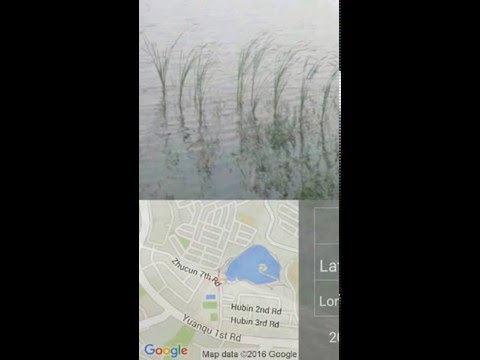
When you take a picture, this application will paste the Google map, address, weather and date to picture. (GPS latitude/longitude information also could be included)
This application is easy to get/set GPS location and GPS coordination for GPS Tag request.
[Quick GPS Map Camera Guideline]
When GPS Map Camera start, map/address/weather will be displayed on the camera preview. You can check the location/coordination before camera capture.
If you want to fine tune the location, manually setup the latitude and longitude also supported. (left-top button)
Support some drawing styles for map/address/weather/date. (left-top second button)
Support a variety of file-name formats to help you arrange your photos. (right-top second button)
You can change the picture save folder for help arrange photos. (right-top button)
In the camera setting page, the similar functions will be grouped with the same color. - Camera Choice - Flash - Scene/Exposure/White Balance/ISO/Color Effect - Focus Mode - Anti-banding - Picture Size/Picture Quality - GPS Use/GPS picture save/Mp Type/Map Resolution/Map Zoom Scale/Map Size - Photo Viewer - Sound - Prompt Dialog The color of function string is white as default. If change to another function, the color will change to grouped color. It's better to recognize what you set.
[Others]
- Camera focus and zoom operation when preview: Focus: use one finger to touch the screen. Zoom: use two fingers to zoom in/out.
- External photo viewer to enhance the viewer ability: This application's photo viewer which we call it "internal viewer". It is easy to use. If you want more powerful GPS photo viewer, you need use external photo viewer. Please setup in the setting page. Select "Photo Viewer" item and then choice "external viewer". It means that "when you click the bottom-left second button, application will launch the external viewer".
- External photo editor: Currently, this application do not provide photo editor functions by itself. But it provides external photo editor. You can select one photo and then launch to external photo editor. After edit finished and go back to this application. It helps to copy/move edited photo to your picture save folder. Please check the following description.
[Tips]
- Don't want to get MAP: Settings -> GPS picture save -> one (original)
- Don't want to save GPS position: Settings -> GPS Use -> disable GPS
[Third party resources which application use] - Google map. ( https://maps.google.com/ ) - Yahoo weather. ( http://weather.yahoo.com/ )
【Recommended External Photo Editor】 ( Line Camera ) https://play.google.com/store/apps/details?id=jp.naver.linecamera.android This APP is now tested more compatible. They support external photo edit more user friendly. Or you can use system photo editor, it also work. (Test on Samsung Phones.)
【PS】 Please like us on Facebook. Give us the power of love. https://www.facebook.com/jkfantasy
【Final】 Thank you for use and watch! Hope this app is helpful for you.
What's new in GPS Map Camera
New in GPS Map Camera 1.8.2
V1.8.2: 1. Minor bugs fixed.
Please rate this app
GPS Map Camera Version History: APK Size & Android Support
Explore the version history of GPS Map Camera for Android and see how the app has evolved over time. This section tracks versions added to the apk.cafe catalog, including download size, declared permissions, and Android compatibility. Select a point on a chart to explore historical version data.
GPS Map Camera Catalog Statistics
Versions added in the last 12 months0
Last version added
Catalog update frequencyNo versions added for over a year
GPS Map Camera Versions Added by Quarter
Q2 20201 version added
New versions in the catalogNo updates since May 2020
1 new GPS Map Camera version was added to the apk.cafe catalog in 2020. The catalog contains 6 versions dating back to June 2017.
GPS Map Camera Download Size History
1.8.2May 29, 20203.61 MB APK
Download size for most phonesNo updates since May 2020
The GPS Map Camera download size for most phones has stayed at about 3.61 MB since version 1.6.2 (2017).
GPS Map Camera Permissions History
1.8.2May 29, 202013 permissions
Permissions declared by the versionNo updates since May 2020
GPS Map Camera 1.8.2 declares 13 permissions, 2 more than version 1.6.2 from 2017 (11).
GPS Map Camera Android Compatibility History
1.8.2May 29, 2020Android 4.0+, built for 9
Requires (minimum Android)Built for (target Android)No updates since May 2020
GPS Map Camera 1.8.2 requires Android 4.0 or newer and is built for Android 9; version 1.6.2 from 2017 ran on Android 3.0 or newer.
Older versions of GPS Map Camera. The apk.cafe catalog has 6 versions of GPS Map Camera, from 1.6.2 (Jun 2017) to GPS Map Camera 1.8.2 (May 29, 2020). If the latest version has a bug, changed something you rely on or does not work on your phone, you can install an earlier one from the list of older GPS Map Camera APK versions below.
Version 1.8.2 needs Android 4.0 or newer. On older phones: Android 3.0 runs up to version 1.7.0 (Jan 2019).
Android does not install an older version over a newer one, so uninstall GPS Map Camera first. This usually deletes the app's data on the phone, so back up anything you need.
Dates show when each version was added to the apk.cafe catalog. Size is the full download for most phones; permissions are for the same build.
GPS Map Camera 1.8.0 permissions
A permission shows what the app can access, not that it uses it.
No high-risk permissions found: No high-risk permissionsAsks first: 6 (46%)Granted automatically: 7 (54%)
Worth knowing
In-app purchasesMay offer paid content through Google Play.
Asks firstShow the list (6)Android asks you before the app gets any of these.
Cameratake pictures and videos
Locationaccess approximate location only in the foreground, access precise location only in the foreground
Photos and videosread locations from your media collection Android 10+
Filesread the contents of your shared storage Android 4.1+, modify or delete the contents of your shared storage
Granted automaticallyShow the list (7)Android grants these at install without a separate prompt. They cover system features.
have full network access
in-app purchases through Google Play
learn how the app was installed (install referrer)
prevent phone from sleeping
read Google services configuration
view network connections
view Wi-Fi connections
Hardware
Made for devices with: Rear camera
Permission changes
Changes since 1.7.8.
Added in this version
read locations from your media collection
learn how the app was installed (install referrer)